

The DSCSA: What You Need to Know
November 27, 2023, is coming and it will be here before we know it. What’s so important about this date? It’s the date that the Drug Supply Chain Security Act (DSCSA) will be completely phased in. As pharmaceutical companies work to reach full compliance, here’s a quick refresher on the DSCSA.
What is the DSCSA?
The Drug Supply Chain Security Act lays out the requirements that everyone involved in the pharmaceutical supply chain must follow. This includes all manufacturers, repackagers, distributors, dispensers, and trading partners. The purpose of the DSCSA is to provide an interoperable system that will be able to track and trace prescription drugs as they are manufactured and distributed across the United States.
What are the benefits?
The DSCSA provides the FDA with the resources to better protect consumers against counterfeit drugs by tracking those drugs through the various stages of production. By building a system to track prescription drugs, the FDA and manufacturers will be better equipped to detect and remove potentially hazardous drugs before they get to the consumer.
What do I need to do?
The first step is to be familiar with the law. After you are familiar with your responsibilities laid out in the DSCSA, work with your trading partners to ensure that they know their roles.
A great way to make sure you are compliant with all the new regulations is to partner with a company that specializes in compliance and validation. RemTech consultants are experts in DSCSA laws and know what it takes to make sure you are compliant. Our consultants work to make you compliant through project management, staff augmentation, validation.
Don’t let the DSCSA deadline sneak up on you. We would love to answer any questions you may have and set you on the right path. Contact us today.

RemTech Consultants: Johnny Colvin
At RemTech, we know that it’s our consultants that make us great. With that in mind, we would like to introduce you to one of our great consultants, Johnny Colvin.
Johnny is a Senior Project Manager Consultant and has been with RemTech since 2018. As a Senior Project Manager Consultant, Johnny provides consultation on Validation, Serialization, Track and Trace Supply Chain B2B, and DSCSA compliance. He is also Fanuc Robotics trained in Handling Tool operations and programming.
After graduating from Alabama A&M University with a Bachelor of Science in Mechanical Engineering Technology, Johnny earned his Master of Science in Management of Information Systems at the University of Phoenix.
Before joining our team at RemTech, Johnny spent over a decade working in the pharmaceuticals industry overseeing validation activities and managing serialization infrastructure developing projects. Johnny’s main focus is to ensure his clients maintain compliance with current laws, FDA regulations, and industry standards.
While Johnny loves working with and supporting his clients, he balances his work with time with his family. He spends his free time playing with his granddaughter or working on fixing up cars. Johnny played baseball in college and loves to attend sporting events whenever possible and spends the off-season playing sports video games.
At RemTech, we are privileged to work with engineers and consultants like Johnny. We are dedicated to our team and strive to create a workplace that fosters creativity and vision. When we asked Johnny what he loves about RemTech he said “The culture and the owners are awesome. I love the RemTech team because everyone shares the same vision and is dedicated to the mission. I have a great degree of control and freedom within my job. I like the autonomy I have because my bosses allow me to innovate.”
We are proud to introduce you to Johnny Colvin- Inspiring Role Model, Sports video game player, Car Connoisseur, RemTech Consultant

The Right Way
The Right Way
When starting a project, many people will tell you what you need to do. You will hear a lot of opinions on what is the “right” way. But what is the right way? The right way to complete a task or project is the way that works for you, and at RemTech, we will help you get there. RemTech has the right team for the right job to ensure your project is done the right way.
The Right Team
At RemTech, our consultants are the right choice for your team. We have experience in many different industries including pharmaceuticals, food, engineering, general industrial manufacturing, construction. We bring that experience to work for you to ensure that your project is completed in an efficient and professional manner. RemTech consultants work as a part of your team, listening, training, and teaching your team as we work to complete your project.
The Right Job
We have the professional experience you need, but that’s just half of it. The other half is the technical know-how to get the job done. We work with organizations to ensure you stay current with all federal, state, and local regulations. We help you create and maintain documentation for the equipment that you use in your facility. For many organizations, we assist in the acquisition and installation of new equipment. At RemTech, we work with your team to develop Standard Operating Procedures to ensure that, even after we’re done, your project can continue to maintain and run smoothly and effectively.
The Right Way
Every business is different, so to make sure that your business is working in the right way we will develop a plan that is suited to your individual needs and goals. Your success is our priority. When you partner with RemTech, you partner with consultants and engineers that focus on your project and the right way for you.
When you are starting a project, do it the right way. Start with the right team to do the right job. Start with RemTech and get things done the right way.

It’s All Coming Together
It’s All Coming Together
A well-functioning machine can have many moving parts. Each of those parts has to work in conjunction with the other parts to make a machine that fulfills its designed purpose. If one part of an engine isn’t working properly, it affects the whole vehicle. In the same manner, all of the different pieces of equipment in your facility need to work correctly and synchronistical to ensure that your manufacturing process is functioning properly. At RemTech, we specialize in many areas. One of those areas is validation and qualification with a focus on the unique aspects and needs of your business.
Validation
While working with an organization, we work hand in hand with Quality, Technical, and Validation teams to produce documentation on the equipment that the facility uses or has recently purchased.
Installation Qualification
The Installation Qualification documents record information pertaining to the equipment in use, such as serial numbers, model numbers, voltage, etc. to be sure what was installed is what was expected to be installed. This document verifies that the equipment has been installed correctly and meets the standards set forth by the manufacturer and installation guidelines.
Operational Qualification
The Operational Qualification documents verify and record that the equipment is in proper working order. Tests are completed to ensure that the equipment operates as expected and according to the manufacturer’s specifications.

Standard Operating Procedures
Standard Operating Procedures, or SOP, provide users with directions on proper usage for each piece of equipment. These documents are specifically written to reflect the needs and operations of your company.
Preventative Maintenance
Preventative Maintenance documents are written for each piece of equipment. The PMs plan out maintenance for the equipment based on the manufacturer’s guidelines. PMs also take into account the usage of the machine so that the maintenance fits with the schedule of your facility.
At RemTech, we are focused on making sure your company runs like a well-oiled machine. Through validation and documentation, we work with your company to provide all the necessary resources that you will need for success.

Writing Your Success Story
Every story has a beginning. A place to start. The story of your business starts with you. Your dreams, your goals, your aspirations, all make up your story. How do you make sure that your story leads to success? By partnering with a company that knows success. RemTech brings over ninety years of combined experience to guarantee your success. Through strategic planning, project management, and operational implementation, we will help you write your story of success.
Strategic Planning
Our consultants with work with you to analyze the individual needs of your company or project. We will identify any potential issues and develop a strategy to resolve those issues. Our team will work with you to establish a budget and timeline for completion.
Project Management
As experienced project managers, we will handle your project in a professional and timely manner. We specialize in the management of construction, renovation, procuring and installing new equipment, and many other areas. RemTech consultants can work as your representative while dealing with contractors to make sure you are getting the best quality work done for the best price.
Operational Implementation
We will assist you in creating a plan and in making that plan a reality, but we don’t stop there. We work to make sure that the implementation of your new project or process smooth and successful. Through staff augmentation, our consultants become a part of your team. We will also build teams and provide training to ensure your project’s success.
RemTech has years of experience writing success stories. When you join us, you can be assured that we will work tirelessly to guarantee the success of your project or process.
So what kind of story are you writing? Write a story of success, write your story with RemTech.

The RemTech Difference
The RemTech Difference
There are many consultants out there but none like the RemTech consultant. Our team of professional consultants can make the impact that you are needing. We take pride in leading the industry in technical services, compliance, and project management. Here is what makes our consultants different.
Technical Services
Our consultants are skilled in a variety of technical areas to ensure your needs are met. We have experienced manufacturing and business management professionals that are focused on your success. Our team strives to provide you with effective solutions to even the most challenging issues.
Compliance & Regulatory
One of the most important aspects of our business is staying current in industry trends and regulatory compliance. RemTech consultants can guarantee that your business falls within the bounds of all federal, state, and local regulations. We have a “right-first-time” approach that is highly cost-effective and streamlines your success.
Project Management
Whether you are upgrading your production system, building a new facility, researching and purchasing new equipment, or starting another new project, our consultants specialize in project management. We will work with your team to make sure your project is completed in an efficient manner. You can trust RemTech consultants to manage projects for you so you will be free to focus on other aspects of your business.
When you partner with RemTech, you get more than just a consultant. You get a team with decades of knowledge and experience. We put that knowledge and experience to work for you. Our success is measured by your success. Ensuring your satisfaction is our goal and we won’t rest until the job is done.
Contact us today to see the difference that RemTech can make.

Growing Pains
Remember when you were a kid and couldn’t wait to grow up? Grownups could stay up as late as they wanted, they didn’t have homework, they could even have ice cream before dinner if they wanted. Being a grownup was the dream. As most of us know, we may be able to have ice cream whenever we want, but growing up also provides us with new challenges and opportunities that we didn’t know about as children.
The same is true for your growing business. Challenges and opportunities come naturally with growth. At RemTech, we want to be there to help you overcome whatever comes your way.
One challenge that many growing businesses will face is utilizing the space to best support your operation and processes. As your business grows, so will your need for stockrooms, workspaces, and warehouses. That’s where RemTech comes in. If you need to expand or modify the facility, we specialize in construction management to make sure you have the workspace to get the job done.
RemTech consultants have experience in construction management from preliminary planning to execution to project completion. We work as your representative, working with engineering firms and contractors to make sure that the work is done within budget and, more importantly, correctly. We coordinate with trade workers, such as electrical, mechanical, and plumbing, as well as specialty services, like security and fire alarm systems, to ensure your building meets all state and local building codes.
The most important thing to remember is that you have a growing business to run. You may not have the resources or time to devote to a new building project. Why not work with a company that knows the ins and outs of construction management and can handle your project from start to finish? We have the resources, connections, and experience needed to successfully handle any building project. Whether we work as consultants or project managers, we will work to provide you with a new facility that meets the needs of your expanding business.
As your business grows, new challenges will arise. Will you be ready? RemTech can make sure you are ready to face these opportunities and succeed. Contact us for a consultation today.

From Ideas to Implementation
You have an idea. You’ve laid the foundation, you’ve set goals, and you’re ready to start your project. The next step is moving your project from an idea to a reality. RemTech specializes in project management and implementation. We put our years of expertise and knowledge to work for you to ensure the success of your project. From space utilization to procuring equipment to staff augmentation, the professionals at RemTech have the experience to help you succeed.
Space Utilization
The layout of your facility or workspace can have a significant impact on your productivity and overall workflow. The efficient placement of equipment, workstations, and production lines can bolster productivity while cutting down on wasted space and downtime. RemTech consultants will work with you to design a layout that will benefit your individual facility and maximize your space.
Procuring Equipment
Buying and upgrading equipment can be a daunting task. Verifying that you are getting the correct equipment for your facility or project while balancing quality versus price can be a challenge. RemTech consultants are up to that challenge. We have an in-depth knowledge of production equipment and the experience to know what will work best for you. We work with companies to upgrade and install new equipment while ensuring they receive the best value possible.
Staff Augmentation
For some projects, having a consultant may not be enough. In those cases, RemTech can provide staff augmentation to help meet your needs. Our consultants can be placed in your facility as a full-time member of your team. Our consultants can work with you on a daily, in-person basis to oversee the project and meet any needs that arise. Having a RemTech consultant as a long term team member provides the experience that you need without the need for an outside hire.
At RemTech, we want to see your project succeed and thrive. Joining with RemTech gives you and your team smart solutions to manage your business and project. Let us help you turn your ideas into reality. Contact us today to start your next project.

Upgrading Windows Operating System
Upgrading Windows Operating System
Ensuring Data Integrity through Optimal Security and Performance
Executive Summary
As Microsoft releases new updates and editions of Windows Operating System (Windows OS), it is harder to verify a device or network is running the right software for its job. This guide explains which editions of Windows OS are appropriate for the pharmaceutical industry to use, in compliance with FDA regulations and guidelines. Ultimately, upgrading to the latest edition of Windows OS will provide users the greatest functionality, especially in areas like serialization where large amounts of data is stored. However, an OS still in its lifecycle, with the most recent updates installed, can provide necessary data security and protection. This technology is the foundation of good data integrity, from record creation to destruction. Following this guide will ensure a device has the proper Windows OS for required functionality, and that it is maintained throughout the future.
Introduction
Windows Operating System (Windows OS) is software that controls the basic functions of a computer. With several Windows OS editions and updates, it can be complicated to know if a device has the proper OS for optimal security and performance. This guide provides an explanation of the differences in Windows OS, as well as guidelines for the use and importance of the appropriate one. This approach follows existing regulations and good manufacturing practices and applies to the most recent changes in pharmaceutical data, including serialization. It will explain the process of upgrading a device to a new edition of Windows OS, or updating a device’s current edition of Windows OS, and how to stay informed when to do so.
Supported Windows OS
With several different Windows OS editions, and versions of each one, monitoring the proper OS for a device can be confusing. To demystify this complexity, it is best to have a clear understanding of the important distinction between supported Windows OS and unsupported Windows OS. Supported Windows OS is a product Microsoft actively sells and maintains. This maintenance mostly consists of releasing updates that fix bugs and offer performance improvements that were initially overlooked, but also includes customer support services. Each edition of Windows OS continues to be supported until the end of its lifecycle. Currently supported Windows OS include Windows 8.1 and several editions of Windows 10.
When an edition of Windows OS concludes its lifecycle, Microsoft classifies it as unsupported. Unsupported Windows OS places the security and performance of systems at risk as Microsoft no longer releases updates that patch vulnerabilities nor provides customer support for it. Though there are exceptions where Microsoft updates unsupported Windows OS, as was done recently for Windows 7, this is volitional and rare (Warren, 2020). Because the use of unsupported Windows OS has inherent risks, Microsoft notifies their customers of important information regarding where a product lies in its lifecycle. To best determine if a particular device’s OS is supported, as well as key dates in its lifecycle, view the Windows Lifecycle Factsheet.
The Microsoft Product Lifecycle
The Microsoft Lifecycle Policy outlines the phases of Windows OS as it matures until being replaced with a newer edition and becoming obsolete. Microsoft states:
“Every Windows product has a lifecycle. The lifecycle begins when a product is released and ends when it’s no longer supported. Knowing key dates in this lifecycle helps you make informed decisions about when to update, upgrade, or make other changes to your software.” (Windows Lifecycle Fact Sheet, 2020)
While distinguishing these key dates is important, it is also necessary to understand what they signify. Microsoft has different lifecycle policies for Windows OS, and with them different phases.
Fixed Lifecycle Policy
The Fixed Lifecycle Policy applies to editions of Windows OS like Windows 7, Windows 8, and some versions of Windows 10. This policy ensures at least 10 years of Microsoft Support for its respective product. Over this period, Microsoft maintains editions of Windows OS through two phases: Mainstream Support and Extended Support. Mainstream Support has a duration of at least 5 years, during which Microsoft provides security updates and incident assistance. Following Mainstream Support, Extended Support has a duration of at least 5 years and provides customers with security updates and additional paid assistance. Key dates for these phases can be found in Table 1, below, or the Windows Lifecycle Factsheet. For more information, view Microsoft’s Fixed Lifecycle Policy.
| Edition of Windows Operating Systems | Mainstream Support End Date | Extended Support End Date |
| Windows 10 Enterprise LTSC | January 9, 2024 | January 9, 2029 |
| Windows 10 Enterprise 2016 LTSB | October 12, 2021 | October 13, 2026 |
| Windows 10 Enterprise 2015 LTSB | October 13, 2020 | October 14, 2025 |
| Windows 8.1 | January 9, 2018 | January 10, 2023 |
| Windows 7, service pack 1 | January 13, 2015 | January 14, 2020 |
Table 1: Key Fixed Lifecycle Dates for Windows OS
Modern Lifecycle Policy
More recently, Microsoft introduced the Modern Lifecycle Policy to incorporate newer products and services. Under this policy, Windows OS is supported if the conditions below are satisfied:
- Customers are current, as per the servicing and system requirements of the OS
- Customers are licensed to use the OS
- Microsoft currently offers support for the OS
Should a Windows OS require customer action to maintain its current status, this policy ensures a minimum of 30 days’ notice prior to its degradation. Additionally, should a Windows OS become obsolete without a successor, this policy ensures a minimum of 12 months’ notice prior to being classified as unsupported. Key dates of the Modern Lifecycle Policy can be found in Table 2, below, or the Windows Lifecycle Factsheet. For more information, view Microsoft’s Modern Lifecycle Policy.
| Edition of Windows Operating Systems | End of Service for Home, Pro, Pro Education, and Pro for Workstations Editions | End of Service for Enterprise and Education Editions |
| Windows 10, version 2004 | May 27, 2020 | December 14, 2021 |
| Windows 10, version 1909 | November 12, 2019 | May 11, 2021 |
| Windows 10, version 1903 | May 21, 2019 | December 8, 2020 |
| Windows 10, version 1809 | November 13, 2018 | November 10, 2020 |
| Windows 10, version 1803 | April 30, 2018 | November 12, 2019 |
Table 2: Key Modern Lifecycle Dates for Windows OS
Security
Though it may seem trivial, upgrading to a Windows OS that is routinely updated via Microsoft Support is essential to data security. Updates are periodically released and are only available to supported Windows OS. They provide performance improvements for greater functionality, but more importantly patch vulnerabilities in the OS software. Though infrequent, these vulnerabilities are inherent within Windows OS and can be exploited by malware to access a device or network. Microsoft continually monitors for these weaknesses and newly discovered flaws to protect against them. This is why using a supported and updated OS is essential for data protection.
A recent case that best illustrates the risk to organizations without a fully updated, supported edition of Windows OS is the May 2017 WannaCry ransomware attack. WannaCry exploited a vulnerability in several editions of Windows OS to block access to, if not delete, stored files, before spreading throughout networks. It reached 150 countries and infected 230,000 computers, promising to restore access to data in exchange for bitcoin. One affected system, that of the UK’s National Health Services (NHS), interrupted appointments, surgeries, and ambulance transport, inducing costs totaling over $100 million as a result (What is WannaCry Ransomware?, 2020). While the computers impacted were running Windows OS with Microsoft Support, only those that had not installed the latest updates – patches that were released two months prior to the attack – were infected. This malware is one of many that demonstrate the importance of ensuring devices run on fully updated and supported editions of Windows OS in order to protect sensitive data.
 Figure 1: WannaCry Ransomware Window (Whittaker, Z., 2019)
Performance
A device running a fully updated, supported Windows OS allows users to receive features that maximize use. Routine updates provide performance improvements, and upgrades to newer editions of Windows OS allow for even greater functionality. In Windows 10, this functionality includes security features like Windows Defender Antivirus, a program that gives added protection from third-party software, and automatic updates, an element which eliminates manual steps required to keep a system secure. Additional performance benefits included in the latest Windows OS incorporate greater cross-platform support, better cloud integration tools, and advances in user interface. All of these allow users to interact with data safely and efficiently.
Regulations and Guidelines
Within pharmaceutics, requirements and guidelines for specific data protections require the security and performance an updated edition of Windows OS provides. The FDA states:
“CGMP regulations and guidance allow for flexible and risk-based strategies to prevent and detect data integrity issues. Firms should implement meaningful and effective strategies to manage their data integrity risks based upon their process understanding and knowledge management of technologies and business models.” (Clark et al., 2019, p. 17)
The security and performance offered by this technology serves as a basis for this, as the proper version of Windows OS minimizes data integrity risks. The FDA further stipulates systems “that create, modify, maintain, or transmit electronic records shall employ procedures and controls designed to ensure the authenticity, integrity, and, when appropriate, the confidentiality of electronic records.” (Title 21: Food and Drugs, 2020) This requisite too can only be ensured with a trusted OS.
Likewise, the MHRA states:
“Data integrity is fundamental in a pharmaceutical quality system which ensures that medicines are or the required quality” (Clark et al., 2019, p. 47)
“The effort and resource applied to assure the validity and integrity of the data should be commensurate with the risk and impact of a data integrity failure to the patient and environment” (Clark et al., 2019, p. 48)
Thus, devices running updated and supported Windows OS are fundamental to not only drug quality but ultimately public safety. These standards ensure stored data is protected from modification or loss, and, when used in conjunction with proper practices, creates the trust and validation required between government, industry, and patients.
Good Manufacturing Practice
Good Automated Manufacturing Practice (GAMP) is one of the many FDA guidelines Windows OS supports. While multifaceted, one aspect of GAMP is the integrity of records and data through data governance. Data governance is defined by the MHRA as:
“The sum total of arrangements to ensure that data, irrespective of the format in which it is generated, is recorded, processed, retained, and used to ensure complete, consistent, and accurate record throughout the data life cycle.” (Clark et al., 2017, p. 21)
It is composed of three main areas: technology, process, and people. Seen in Figure 2, each area is organized under its own controls that guide decisions for data integrity and security.
Technical Controls
Technical controls prevent the unauthorized deletion or modification of regulated data and records via user access arrangements. Additionally, they preserve copies of data through a combination of backup and recovery processes and validated security controls (Clark et al., 2017, p. 19). Using a supported Windows OS sets the foundation for strong technical controls. It ensures the most secure access to and modification of data records, and that integrated controls cannot be evaded due to flaws in the software system. The installation of released updates to supported Windows OS is a key part of maintaining this security. In addition, upgrading to the newest editions of Windows OS provides access to the latest backup and recovery technologies, such as cross-platform connected devices and tools for the cloud.
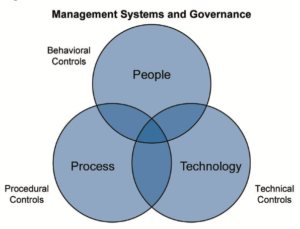 Figure 2: Controls for Data Governance (Clark et al., 2017, p. 21)
Procedural Controls
Procedural controls minimize the risk to data integrity, identify the residual risk of following the principles of ICH Q9, and assess risk associated with third-party software (Clark et al., 2017, p. 19). While they relate to the processes that utilize technology rather than the technology itself, using a supported Windows OS is still important in maintaining these controls. Windows OS aids in the process of ensuring data integrity by inherently minimizing risk to it. Features like Windows Defender Antivirus help evaluate the safety and risk associated with third party software, in addition to the use of similar programs available.
Behavioral Controls
Behavioral controls relate to the maintenance and training for data integrity, the preservation of a work environment that promotes data transparency, and the ownership of data over its lifecycle. The maintenance of data integrity and preservation of data transparency are upkept through the protections and channels that are included in supported Windows OS functionality. While the ultimate ownership of data relates to the actions of the users that behavioral controls govern, Windows OS plays a key role in its protection through the data lifecycle.
The Data Lifecycle
The data lifecycle represents all phases of data from its initial creation to final destruction. Depicted in Figure 3, it contains five phases. A supported Windows OS ensures data integrity throughout each phase.
Data Creation
Data can be created manually through user input or via the use of an instrument or measuring device. Its integrity can be compromised at the point of creation by lacking appropriate accuracy, completeness, content, and meaning. Windows OS limits these risks by safely storing created data through properly authorized channels.
Processing
Data processing is the phase in which the required information is formatted and derived from created data. Though it varies by product and business process, data processing has a direct impact on product quality and patient safety (Clark et al., 2017, p. 35). Windows OS supports programs necessary for secure processing.
Review, Reporting, and Use
During review, reporting, and use, data is used for informed decision making, through defined and verified processes most typically related to record documentation. Windows OS serves as the foundation for appropriate data access during documentation activities.
Retention and Retrieval
Throughout retention and retrieval, data is readily available for any entity or regulator approved to review it. Windows OS protects stored data for the length of its retention period, as in accordance with defined and verified processes and approved procedures.
Destruction
Data destruction occurs at the conclusion of the retention period, when all regulations for destruction are met and the data is completely cleared to be disposed. Given appropriate controls, Windows OS will not destroy data until properly authorized and protect against data destroying malware.
In this way, a device with Windows OS ensures only those with proper access can create, process, review, and destroy data. Working with the newest editions of Windows OS bolsters these functions through data management via cloud tools and other performance capabilities.
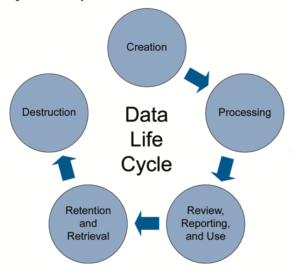 Figure 3: The Data Lifecycle (Clark et al., 2017, p. 33)
Serialization
The Drug Supply Chain Security Act (DSCSA) provides regulations to help the industry identify suspect and illegitimate products in the prescription drug distribution system in the United States. A core practice that supports this legislation is serialization, a process to track and trace pharmaceutical drug products through the complete supply chain. This process identifies legitimate products at the unit, inner-pack, case, and pallet level of production and relies heavily on the security and integrity of data. From data protection to cross-platform access and storage via the cloud, Windows OS acts as a pharmaceutical company’s foundation for security and integrity throughout this process.
Upgrade Considerations
As in upgrading any system, there are important factors to be considered. Though it depends on age and configuration, most devices operating on Windows 7 or newer can be fully upgraded within an hour (Upgrade to Windows 10: FAQ, 2020). Pending on the age of a computer, in some instances, a new device will be required to upgrade to the newest versions of Windows OS. Additionally, some devices may require freeing up or acquiring additional storage space. Large-scale deployment of the latest editions of Windows 10 can be arranged through the use of the Microsoft Development Tool kit. For more information, view Microsoft’s Windows Update: FAQ.
Windows OS Maintenance
Fortunately, once a device’s OS is upgraded to Windows 10, maintaining the software takes less effort than before. Without any work from the user, automated updates on the latest editions of Windows OS will install routine fixes and improvements as they are released by Microsoft. These updates can be scheduled within the Update and Security tab of the Settings menu. Details regarding updates available, and the most recent updates installed, can be viewed on this tab as well. While Microsoft sends notifications related to the end of a product’s lifecycle, the best resource to find information related to a specific Windows OS and the timeframe to upgrade to a newer edition is the Windows Lifecycle Factsheet.
Conclusion
This guide explains the importance of a fully updated and supported Windows Operating System in the pharmaceutical industry, and the processes Microsoft follows to release improvements and phase out old software. Through these processes, devices running Windows OS receive the latest security features and performance improvements that protect the access, storage, and transfer of data. In compliance with Good Manufacturing Practices, Windows OS provides the infrastructure to uphold the latest pharmaceutical standards as well as international regulations and guidelines. The latest editions of Windows OS automate updates and emphasize timeframes to upgrade to new OS software, making such standards and practices easier to follow. Running devices and networks on a fully updated Windows OS with Microsoft Support will ensure the highest degree of software security and data integrity for a pharmaceutical company.
References
Clark, C., Jones, C., Margetts, T., Newton, M., Perez, A., Reid, C., . . . Wingate, G. (2017). ISPE GAMP Records and Data Integrity Guide. Tampa, FL: ISPE.
Fixed Lifecycle Policy – Microsoft Lifecycle. (2019, September 19). Retrieved August 31, 2020, from https://docs.microsoft.com/en-us/lifecycle/policies/fixed
Grynoch, T. (2018). Data Lifecycle. Retrieved August 31, 2020, from https://nnlm.gov/data/thesaurus/data-lifecycle
Lindsay, G., Hall, J., Keller, L., Poggemeyer, L., Lich, B., Hernandez Avedon, M., . . . Mariano Gorzelany, A. (2020, August 13). Windows 10 deployment scenarios (Windows 10) – Windows Deployment. Retrieved August 31, 2020, from https://docs.microsoft.com/en-us/windows/deployment/windows-10-deployment-scenarios
Modern Lifecycle Policy – Microsoft Lifecycle. (2020, January 10). Retrieved August 31, 2020, from https://docs.microsoft.com/en-us/lifecycle/policies/modern
Title 21: Food and Drugs. (2020, August 28). Retrieved September 01, 2020, from https://www.ecfr.gov/cgi-bin/text-idx?SID=63804c565597c0de4c2f5628c5381d47
Upgrade to Windows 10: FAQ. (2019, July 29). Retrieved August 31, 2020, from https://support.microsoft.com/en-us/help/12435/windows-10-upgrade-faq
Warren, T. (2020, January 27). Microsoft Forced to Create a Free Windows 7 Update Just Days after Updates Ended. Retrieved September 01, 2020, from https://www.theverge.com/2020/1/27/21082228/microsoft-windows-7-black-wallpaper-fix-update-support-patch
What is WannaCry Ransomware? (2020, June 11). Retrieved August 31, 2020, from https://www.kaspersky.com/resource-center/threats/ransomware-wannacry
Whittaker, Z. (2019, May 12). Two years after WannaCry, a million computers remain at risk. Retrieved August 31, 2020, from https://techcrunch.com/2019/05/12/wannacry-two-years-on/
Windows Lifecycle Fact Sheet. (2020, August). Retrieved August 31, 2020, from https://support.microsoft.com/en-us/help/13853/windows-lifecycle-fact-sheet
Windows Update: FAQ. (2020, August 11). Retrieved August 31, 2020, from https://support.microsoft.com/en-us/help/12373/windows-update-faq

Steps to Success: Know Your Goal
When you prepare to do a task, you need to set a goal. Sometimes our goals are big, like running a marathon in record time. Other times, our goals seem small, like only hitting the snooze button three times. Either way, setting goals is an important step towards success. The same is true for businesses. What are the goals that your company is trying to reach? What steps are you taking to reach these goals? Are those goals attainable within the steps that you have planned?
At RemTech, one of our goals is to make sure your company meets its goals.
Completing a project within a specified time frame is a very common goal. Meeting the needs of your clients and customers in a timely manner can set you apart from your competitors. To do this, you need the best team, the best equipment, and the best advisors. RemTech can provide you with these things through staff augmentation, project management, and many years of professional experience.
Staff Augmentation
A RemTech consultant is more than just a consultant. Our professionals will integrate into your team to help with training and implementation planning during your project. We become a part of your team to share our knowledge and experience to make your team the best it can be.
Project Management
When starting a project or upgrading equipment there are many variables to consider. What equipment do you need? What is a manageable timeframe? Where do you even start?
RemTech consultants specialize in project management. This means that we will be there for you, guiding you through every step of the process. From planning the project, purchasing equipment to installation and implementation, we have the experience you need.
Professional Experience
Our team of dedicated professionals have decades worth of experience in project management. The leadership and knowledge that we bring to your team are one of a kind. We know the competitive landscape, as well as regulatory and compliance guidelines, so we can put you at the forefront of your industry.
RemTech is the company that can help you reach your goals. We can provide you with the tools you need for success. Contact us today to see what we can do for you.